Purchase Invoice Details
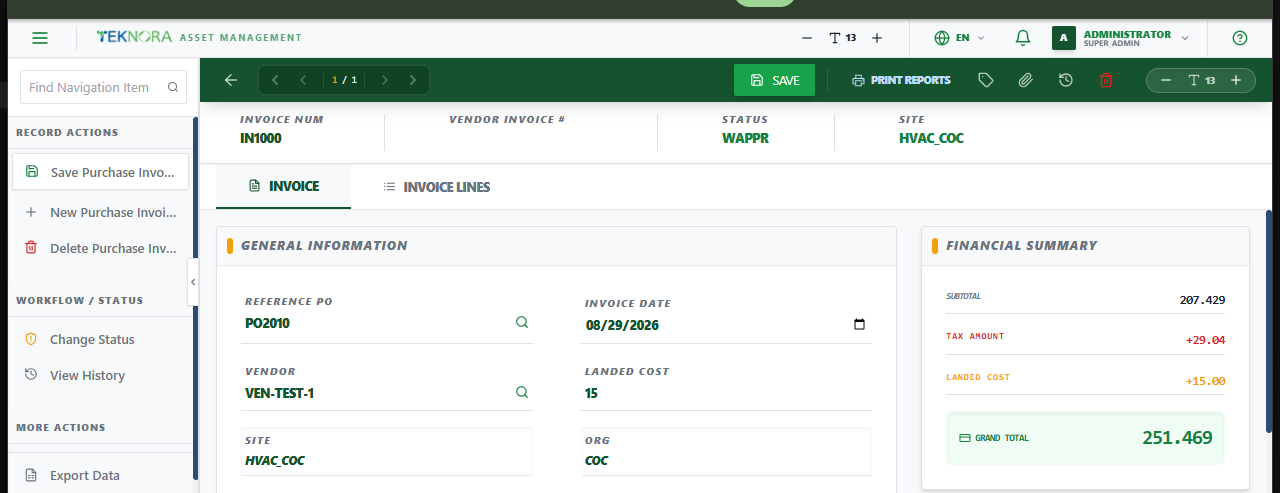
This screen holds one purchase invoice's header, financial summary, and lines - and is where approving it finalizes the real financial impact on inventory.
Screen layout
- Invoice: General information (reference PO, vendor, invoice date, landed cost) and the Financial Summary card (subtotal, tax, landed cost, grand total).
- Invoice Lines: The billed items, pulled from the referenced PO's received quantities and costs by default, styled the same way as PO/PR lines.
Top toolbar actions
| Icon/Button | Function |
|---|---|
| Save | Saves the header and all lines |
| Change Status (tag icon) | Opens the status-change dialog (WAPPR → APPR → ...) |
| Print Reports | Prints/exports the invoice |
| Attachments | Attach or view files linked to this invoice |
| History | Shows the invoice's status change history |
| Delete | Deletes the record - only while WAPPR and not yet posted |
How to
1. Create an invoice from a received PO
Search Reference PO - vendor and lines (item, received quantity, unit cost) are pulled in automatically. Enter the Vendor Invoice # for your own records, and any Landed Cost (freight, customs, etc.).
2. Approve and post the invoice
Click the status icon, choose APPR, and confirm. This is the moment the invoice becomes final:
- Landed cost is distributed across the invoice's lines proportionally to their value.
Inventory.avgcostfor each item is updated to reflect the added cost.- An audit transaction (
INVOICE_ADJ) is recorded against inventory for traceability. - The invoice is marked posted and locks permanently - it can no longer be edited or deleted, even if its status changes again later.
Posting can't be undone
Once an invoice is approved and posted, its cost impact on inventory is final. Double-check the landed cost and line costs before approving.
FAQ
Why is my invoice's landed cost field separate from the PO's line costs? The PO's unit costs are the agreed price per the order. Landed cost is everything extra it took to actually get the goods into your warehouse (freight, customs, handling) - it only becomes known at invoice time, which is why it's tracked here rather than on the PO or the receiving screen.
Can I edit an invoice after it's posted?
No - once posted is true, the record is permanently locked, regardless of what status it's later moved to. This protects the inventory valuation history from being silently changed after the fact.
Go to: Purchase Invoices list ← · Purchase Orders → · Receiving →