Purchase Requests
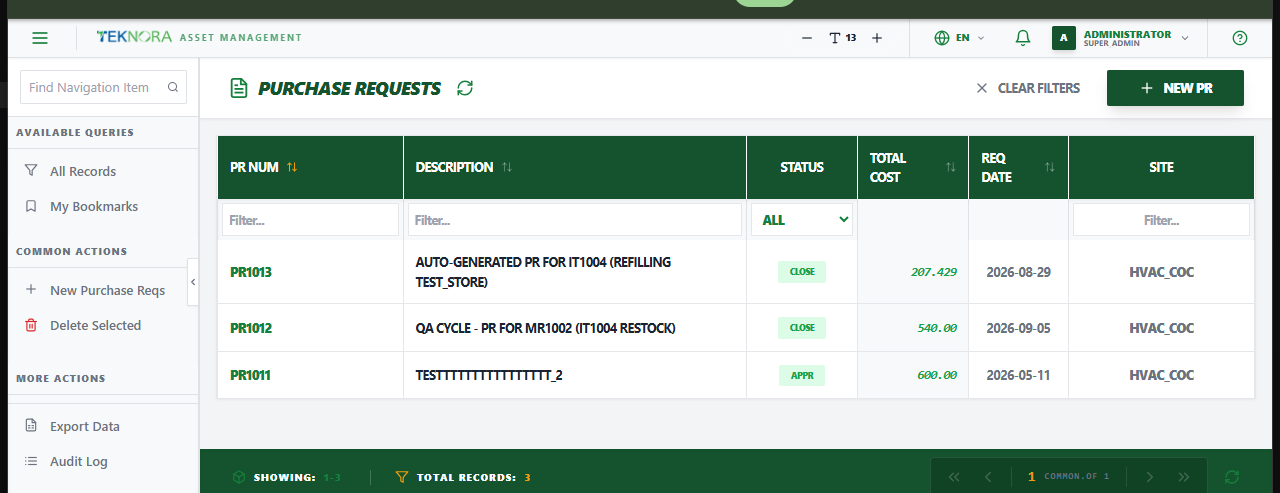
The Purchase Requests screen lists every internal purchase requisition - the step before a formal Purchase Order, used to request approval to buy something before committing a vendor.
Purpose of this screen
- Browse all purchase requests and their status.
- Search and filter by PR number, description, status, or site.
- Open any PR's details to review or edit its lines, or change its status.
- Create a new purchase request.
Key screen elements
| Element | Function |
|---|---|
| New PR | Opens an empty details screen to enter a new purchase request |
| Search box | Quick text search on PR number or description |
| Sortable column headers | Click any column to sort ascending/descending |
| Filter row | Type or select under any column header to filter by it |
| Clear Filters | Resets all applied filters at once |
Table columns
- PR Num: The purchase request's unique identifier.
- Description: A short description of what's needed.
- Status: Current status (
WAPPR,APPR,CLOSE,CAN). - Total Cost: The request's total estimated cost.
- Req Date: The date the request was raised.
- Site: The organizational site the PR belongs to.
How to
1. Create a PR directly
Click New PR, add lines (search an item or type one in manually), and save.
2. Create a PR from a Material Request
Open a Material Request, approve it, and use Create PR from its sidebar - lines transfer over automatically with the requested quantities and store location.
3. Create a PR automatically from a reorder point
If an inventory item drops to or below its reorder point, the scheduled inventory worker can generate a PR for it automatically (requestedby: WORKER_SERVICE, description prefixed "Auto-generated"). Review and approve it like any other PR.
4. Open a PR's details
Click any row to open its Purchase Request Details screen.
FAQ
What's the difference between a PR and a PO? A PR is an internal request to buy something - it doesn't commit to a vendor. Once approved, you generate a PO from it (or manually create one), which is the formal, vendor-facing order.
Can I delete a PR?
Only while it's WAPPR, and only if no PO or RFQ has already been generated from it.