Purchase Invoices
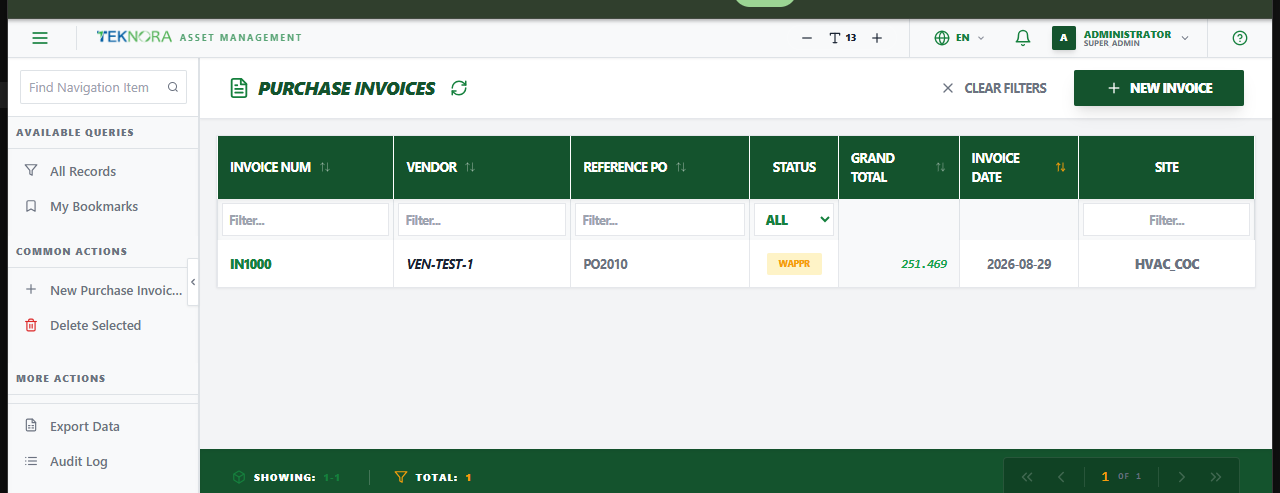
The Purchase Invoices screen is where a Purchase Order's financial side gets closed - after Receiving has settled the physical quantity, an invoice records the vendor's actual bill and finalizes cost against inventory.
Purpose of this screen
- Browse all purchase invoices and their status.
- Search and filter by invoice number, vendor, or reference PO.
- Open an invoice to review or edit it, or approve it to post costs.
- Create a new invoice.
Table columns
- Invoice Num, Vendor, Reference PO, Status, Grand Total, Invoice Date, Site.
How to
1. Create an invoice for a received PO
Click New Invoice, and reference the Purchase Order - vendor and lines (with received quantities and costs) are pulled in automatically.
2. Open an invoice's details
Click any row to open its Purchase Invoice Details screen.
Why Invoices are separate from Receiving
Receiving only ever settles quantity - what physically arrived and where. The invoice is the financial event: it carries the vendor's actual billed amount, any landed cost (freight, customs...), and is what finally updates inventory valuation once approved. This mirrors how procurement works everywhere: commitment (PO) → physical receipt (Receiving) → financial settlement (Invoice).