Receiving & Inspection
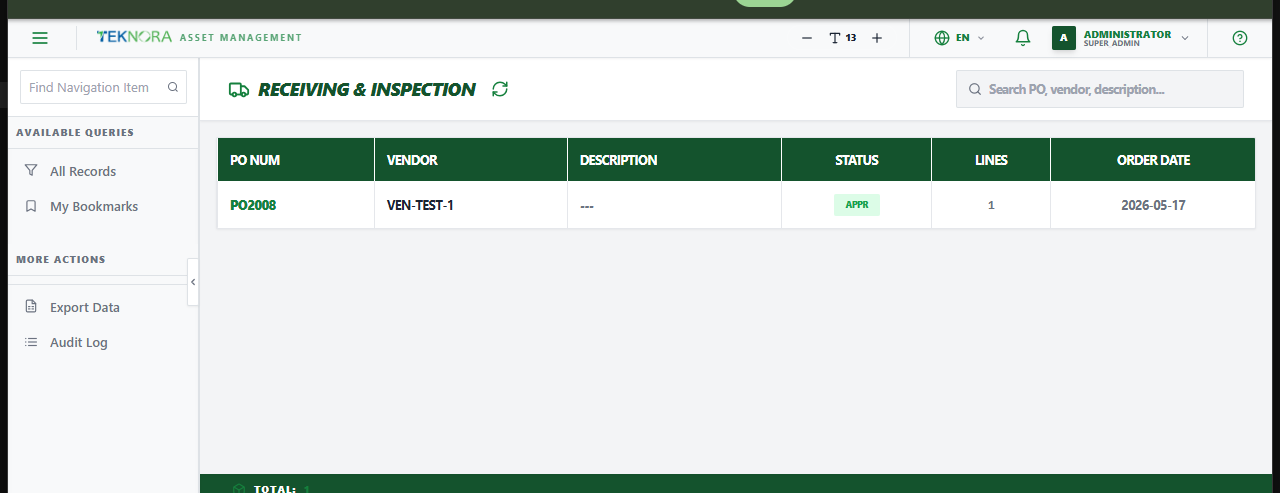
The Receiving screen lists every approved purchase order still open for physical receipt - this is where goods arriving from vendors get recorded into stock.
Purpose of this screen
- See every PO with quantity still outstanding (status
APPRorPARTIAL). - Search by PO number, vendor, or description.
- Open a PO to process the physical receipt of its lines.
Table columns
- PO Number, Vendor, Description, Status, Lines, Order Date.
How to
1. Find a PO to receive
Search by PO number or vendor, or just scan the list - only POs with something still pending appear here.
2. Open it to start receiving
Click the row to open the Bulk Receiving Hub for that PO.
Receiving is quantity only
This screen records what physically arrived and where it went. The final cost (landed cost, freight, customs) is recorded separately on a Purchase Invoice once the goods are in.
Go to: Receiving Details screen →