Receiving Details (Bulk Receiving Hub)
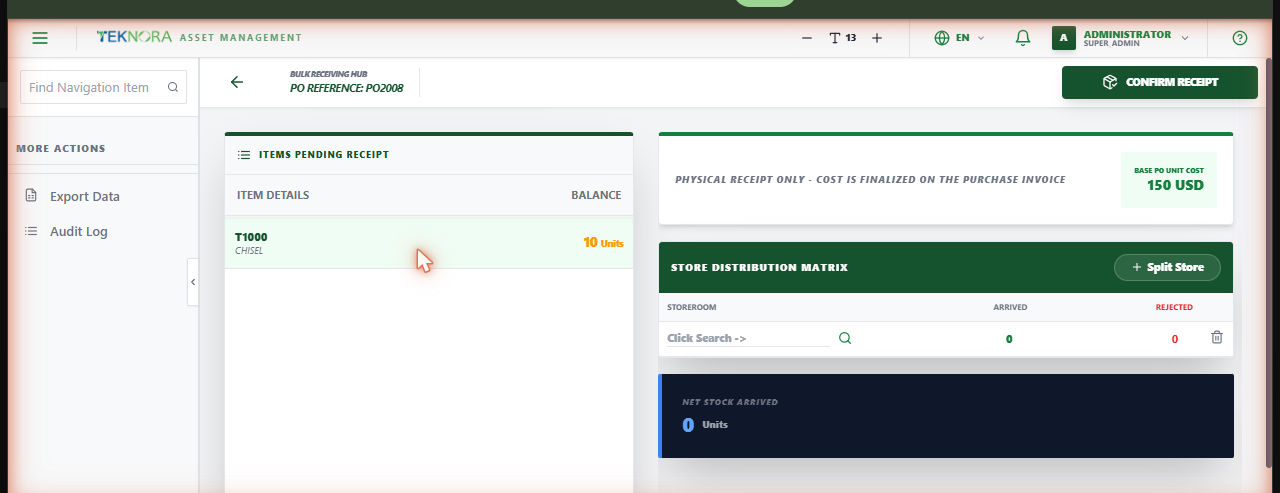
This is where you record what physically arrived against an approved purchase order - line by line, split across storerooms if needed, with optional rejection tracking.
Screen layout
- Items Pending Receipt: The left panel lists every PO line that still has quantity outstanding, with its remaining balance.
- Store Distribution Matrix: After selecting a line, this panel is where you record how many units arrived (and to which storeroom), and how many were rejected.
Each line shows its Base PO Unit Cost for reference - a reminder that cost isn't finalized here; it's finalized on the Purchase Invoice.
How to
1. Select a pending line
Click an item in the left panel to open its receiving form.
2. Choose the storeroom
Search and select the storeroom the stock is going into.
3. Enter arrived (and rejected) quantity
Type how many units physically arrived. If any are rejected (failed inspection, damaged, etc.), enter that quantity too - it's tracked separately and doesn't add to stock.
4. Split across more than one storeroom (optional)
Use Split Store to distribute one line's arrival across multiple storerooms in a single receipt.
5. Confirm the receipt
Click Confirm Receipt. Stock balances and average cost update immediately for every storeroom involved.
Inspection-required items
Some items and tools are flagged as requiring inspection before acceptance. If a line is flagged, you must record an inspection decision - the system won't let the receipt through without one.
Automatic chain closure
Once a PO's lines are fully received, its status updates to COMPLETE automatically. If the PO originated from a Purchase Request (and that PR from a Material Request), both close automatically too - you'll see a confirmation naming exactly what was closed.
FAQ
I received a rotating item (like a tool that becomes an individual asset) - what happens?
Each accepted unit automatically creates its own asset record (status NOT READY), numbered the same way as any other asset in the system.
The PO shows PARTIAL after I received everything I have - is that a bug?
No - PARTIAL means at least one line still has outstanding quantity. It only becomes COMPLETE when every line's full ordered quantity has been received (or otherwise accounted for).
Go to: Receiving list ← · Purchase Orders → · Purchase Invoices →