Issues & Transfers
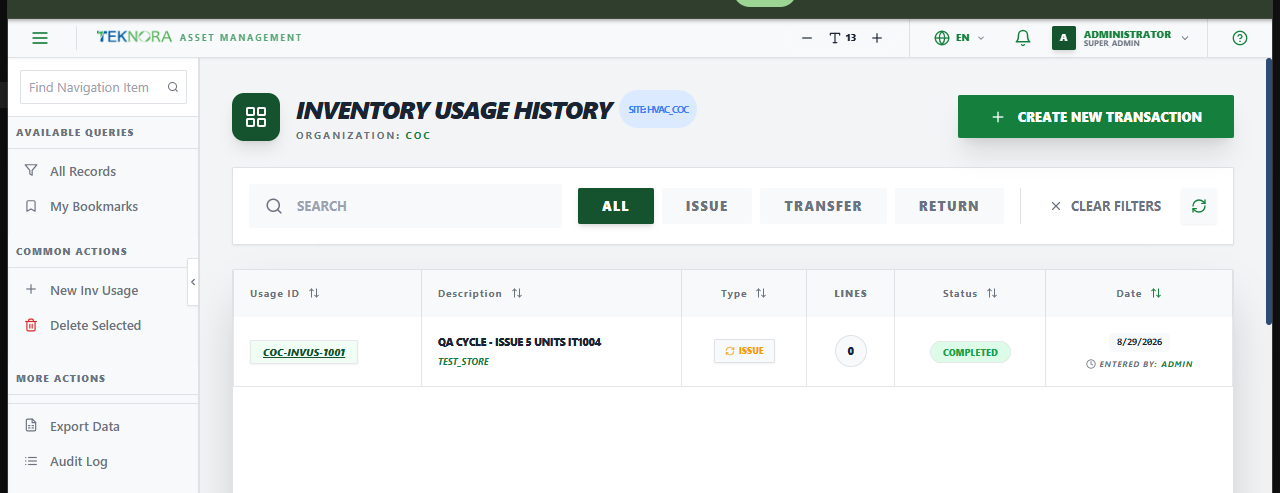
The Issues & Transfers screen (Inventory Usage History) lists every stock movement transaction - issuing material out of a storeroom, transferring it between storerooms, or returning it back to stock.
Purpose of this screen
- Browse every issue/transfer/return transaction and its status.
- Filter by type: All, Issue, Transfer, Return.
- Open a transaction to add lines and complete it.
- Create a new transaction.
Table columns
- Usage ID, Description, Type, Lines, Status, Date.
How to
1. Create a new transaction
Click Create New Transaction, choose the Type (Issue/Transfer/Return), and save - the Usage ID is generated automatically.
2. Open a transaction's details
Click any row to open its Issue/Transfer Details screen.