Purchase Orders
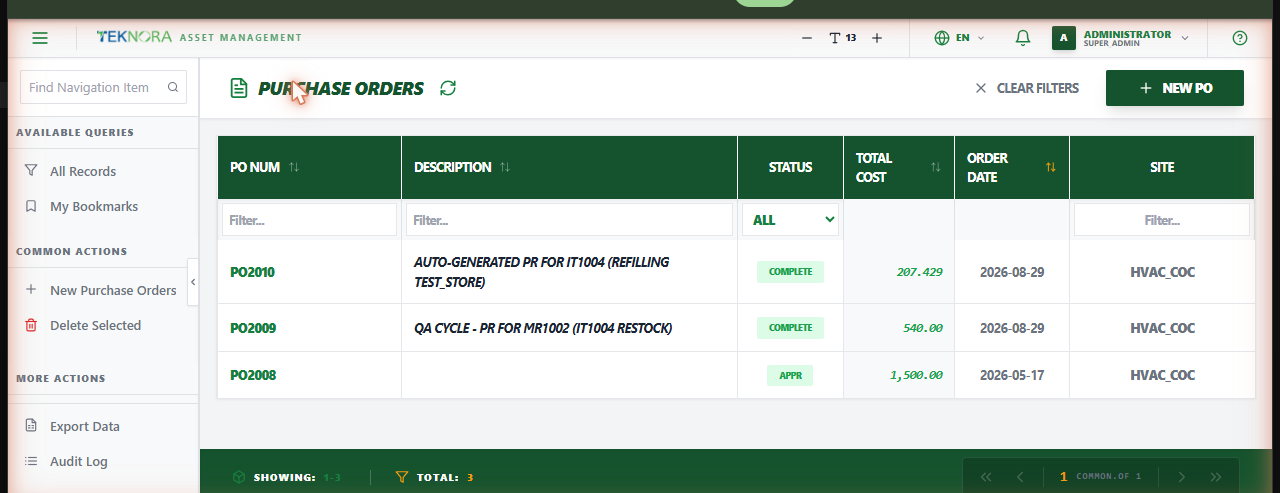
The Purchase Orders screen lists every purchase order in the organization/site - the formal, vendor-facing commitment to buy items or tools, whether created directly or generated from an approved Purchase Request.
Purpose of this screen
- Browse all purchase orders and their status (waiting approval, approved, partially received, complete, closed, cancelled).
- Search and filter by PO number, description, status, vendor, or site.
- Open any PO's details to review its lines, financial summary, or change its status.
- Create a new purchase order.
Key screen elements
| Element | Function |
|---|---|
| New PO | Opens an empty details screen to enter a new purchase order |
| Search box | Quick text search on PO number or description |
| Sortable column headers | Click any column to sort ascending/descending |
| Filter row | Type or select under any column header to filter by it |
| Clear Filters | Resets all applied filters at once |
Table columns
- PO Num: The purchase order's unique identifier.
- Description: A short description of what's being ordered.
- Status: Current status (
WAPPR,APPR,PARTIAL,COMPLETE,CLOSE,CAN). - Total Cost: The order's grand total (items + tax).
- Order Date: The date the order was placed.
- Site: The organizational site the PO belongs to.
How to
1. Create a new PO directly
Click New PO, fill in the vendor and lines, then save. Use this when you're ordering something that didn't go through a formal Purchase Request.
2. Create a PO from an approved Purchase Request
Open the Purchase Request, approve it, then use Create PO from its sidebar - the vendor, lines, and quantities carry over automatically.
3. Open a PO's details
Click any row to open its Purchase Order Details screen.
A PO always needs a vendor before it can be approved or saved with lines locked
Purchase Order Details requires a vendor before the record can be saved or its status changed - this is enforced by the system, not just a suggestion.
FAQ
Why can't I edit a PO's lines anymore?
Once a PO's status is APPR, COMPLETE, CAN, or CLOSE/CLOSED, its lines and header lock for editing - this protects records that vendors have already acted on or that already have receipts posted against them. Cancel/reopen isn't available from lines that already have received quantity.
Can I delete a PO?
Only while it's still WAPPR and has no received quantity on any line. Once anything's been received, or the record has moved past WAPPR, delete is blocked - cancel it instead.