Storeroom Details
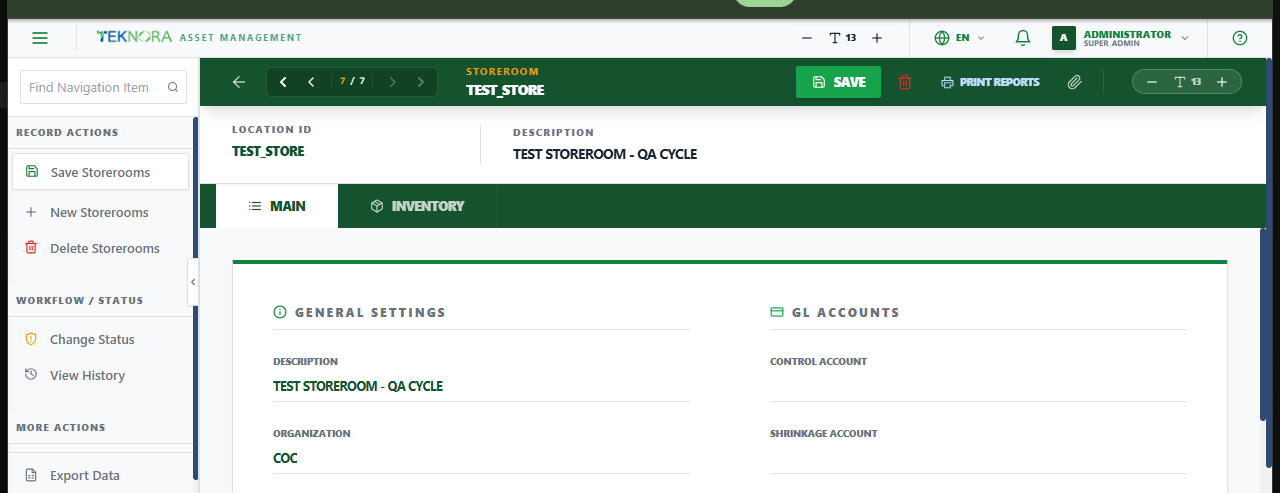
This screen holds one storeroom's settings and, on its Inventory tab, every item currently stocked there.
Screen layout
- General Settings: Description, Organization, Site, Inventory Owner, Default Storeroom? (marks it as the site's default store), and Use in PO? (whether it can be selected as a receiving destination on purchase orders).
- GL Accounts: Control Account, Shrinkage Account, and Default GL Account - all material issues and receipts for this storeroom are balanced against these accounts.
- Inventory: Every item stocked in this storeroom, with balance and status.
How to
1. Create a new storeroom
Enter a unique Location ID and Description, confirm Organization/Site, and save. Check Use in PO? if vendors should be able to deliver directly to it.
2. See what's stocked here
Open the Inventory tab to review every item's balance in this storeroom - or assign a new item to it from Item Details → Add To Store.
FAQ
Can I have more than one storeroom per site? Yes - only one can be the site's Default Storeroom, but there's no limit on how many storerooms a site can have.
Go to: Storerooms list ← · Item Master → · Inventory Balances →