Tools
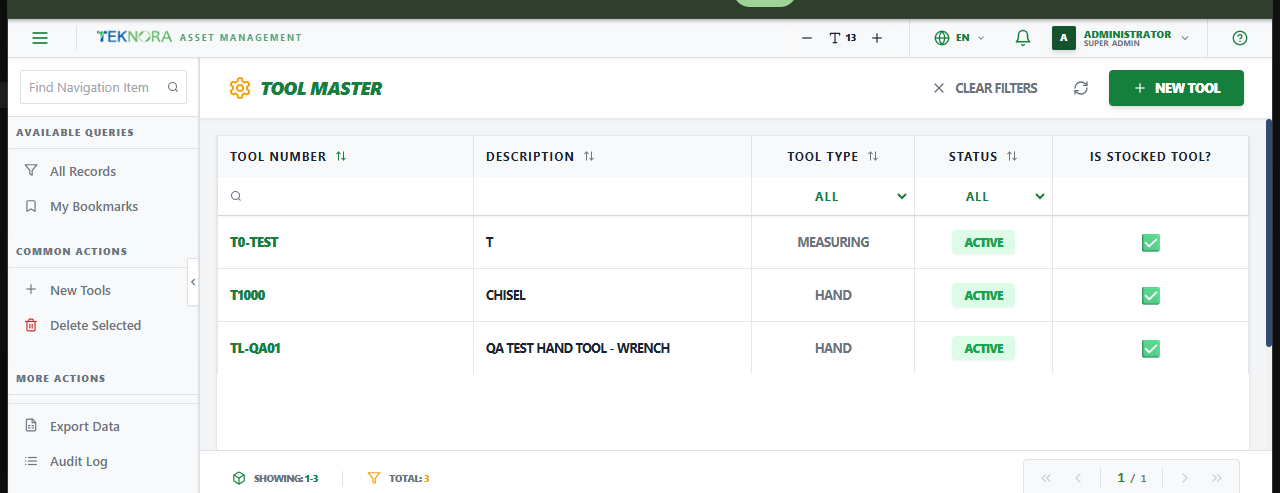
The Tools screen is the master list of hand and powered tools used in maintenance work - separate from stockable Items, with their own tracking for calibration and issuance.
Purpose of this screen
- Browse every tool defined in the system.
- Search and filter by tool number, description, tool type, or status.
- Open a tool to edit its definition or assign it to storerooms.
- Create a new tool.
Table columns
- Tool Number, Description, Tool Type, Status, Is Stocked Tool?.
How to
1. Create a new tool
Click New Tool, enter a description and tool type, then choose its tracking style (see below) and save.
2. Open a tool's details
Click any row to open its Tool Details screen.
Stocked vs. Rotating tools
Check Is Stocked Tool? for tools tracked by quantity in a storeroom (consumable or bulk hand tools). Check Rotating Item? instead for tools where each physical unit needs its own individually tracked asset record (e.g. calibrated equipment). A tool is normally one or the other, not both.
Go to: Tool Details screen →