Inventory Balance Details
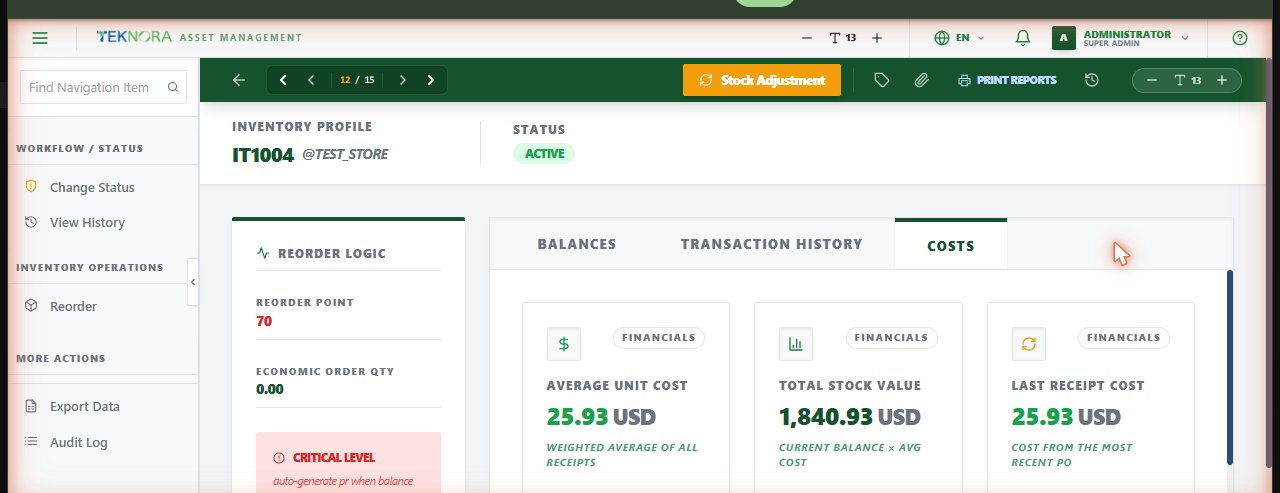
This screen is the single source of truth for one item's stock in one storeroom - its current quantity, full transaction history, costing, and reorder settings.
Screen layout
- Balances: Current stock level and quantity reserved for work orders.
- Transaction History: Every movement against this balance - initial stock, receipts (with PO reference), issues, and adjustments - each with date, quantity, actual cost, user, and reference.
- Costs: Average unit cost, total stock value (balance × avg cost), and the cost from the most recent PO receipt. This item uses the moving average costing method - the unit cost recalculates automatically on every receipt.
- Reorder Logic (side panel): Reorder point, economic order quantity, and a warning banner when stock is at or below a critical level.
How to
1. Do a physical/cycle count
Click Stock Adjustment. Enter the Actual Physical Count you counted - the dialog shows the variance versus the expected balance - and a reason in Adjustment Reason/Memo, then post. The balance updates immediately; average cost is unaffected by count adjustments (only receipts change cost).
2. Set a reorder point
Click Reorder in the sidebar. Enter the Reorder Point (Quantity) and Safety Stock (Minimum), then apply. Once the point is set above zero, this item/store becomes eligible for automatic reordering.
3. Issue or transfer stock
Use Issues & Transfers - this screen itself doesn't move stock out, only adjusts it via physical count.
How automatic reordering works
A scheduled background job checks every item/storeroom with reordering enabled once an hour. If the balance is at or below the reorder point, it automatically generates a Purchase Request for the shortfall (reorder point − balance + 1, or the item's order quantity if set), tagged as auto-generated - unless an open PR already covers that item/store. Review and approve it like any other PR.
FAQ
I set a reorder point below the current balance and nothing happened - why? Nothing should happen in that case - reordering only triggers once the balance drops to or below the point you set. If balance is already below the point you just set, expect a PR to appear within the hour on the next scheduled check.
Why did average cost change after I did a physical count? It shouldn't - a stock adjustment corrects quantity only. If average cost changed at the same time, check the Transaction History for a receipt that landed around the same time.
Go to: Inventory Balances list ← · Item Master → · Purchase Requests →