Inventory Balances
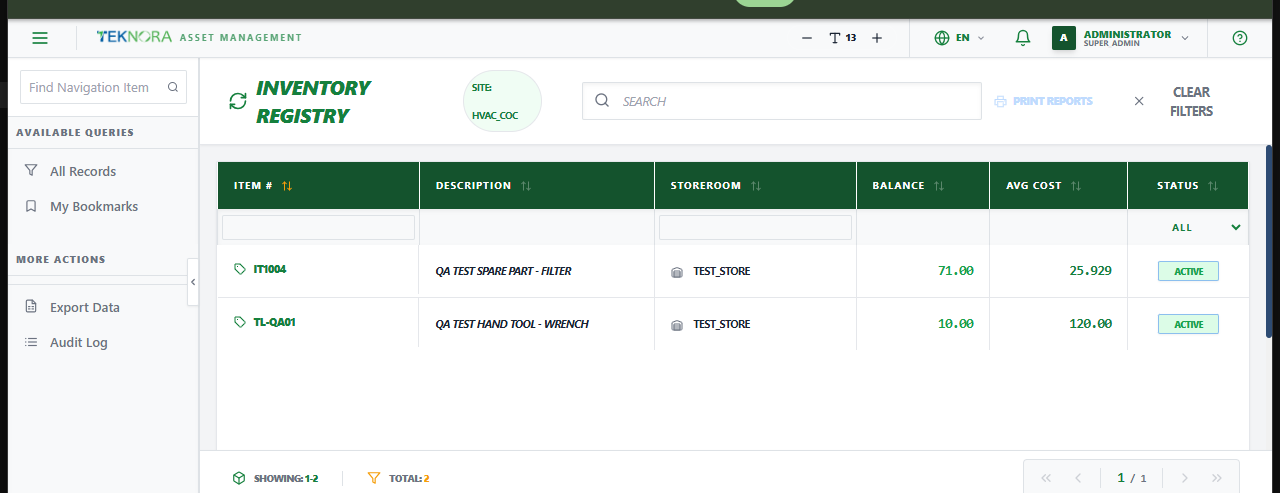
The Inventory Balances screen (Inventory Registry) lists every item/storeroom combination currently holding stock - the actual balances behind everything in Item Master, separate from the item's own definition.
Purpose of this screen
- See every item's balance, storeroom, and average cost at a glance.
- Search and filter by item, storeroom, or site.
- Open a balance record to adjust stock, review its transaction history, or check its costing.
Table columns
- Item #, Description, Storeroom, Balance, Avg Cost, Status.
How to
1. Find an item's balance in a specific store
Search or filter by item number or storeroom.
2. Open a balance record
Click any row to open its Inventory Balance Details screen.